Is there a free tinnitus sound generator I can try right now?
Yes — the player below generates white, pink, brown, and green noise free in your browser, no account needed. Tap a colour, set the volume so your tinnitus is still faintly audible, and press play. The browser player stops when you take a call or switch apps. The free Tinnitus Relief App keeps playing through phone calls, Zoom, and a locked screen.
What does the Tinnitus Relief App add that a browser cannot?
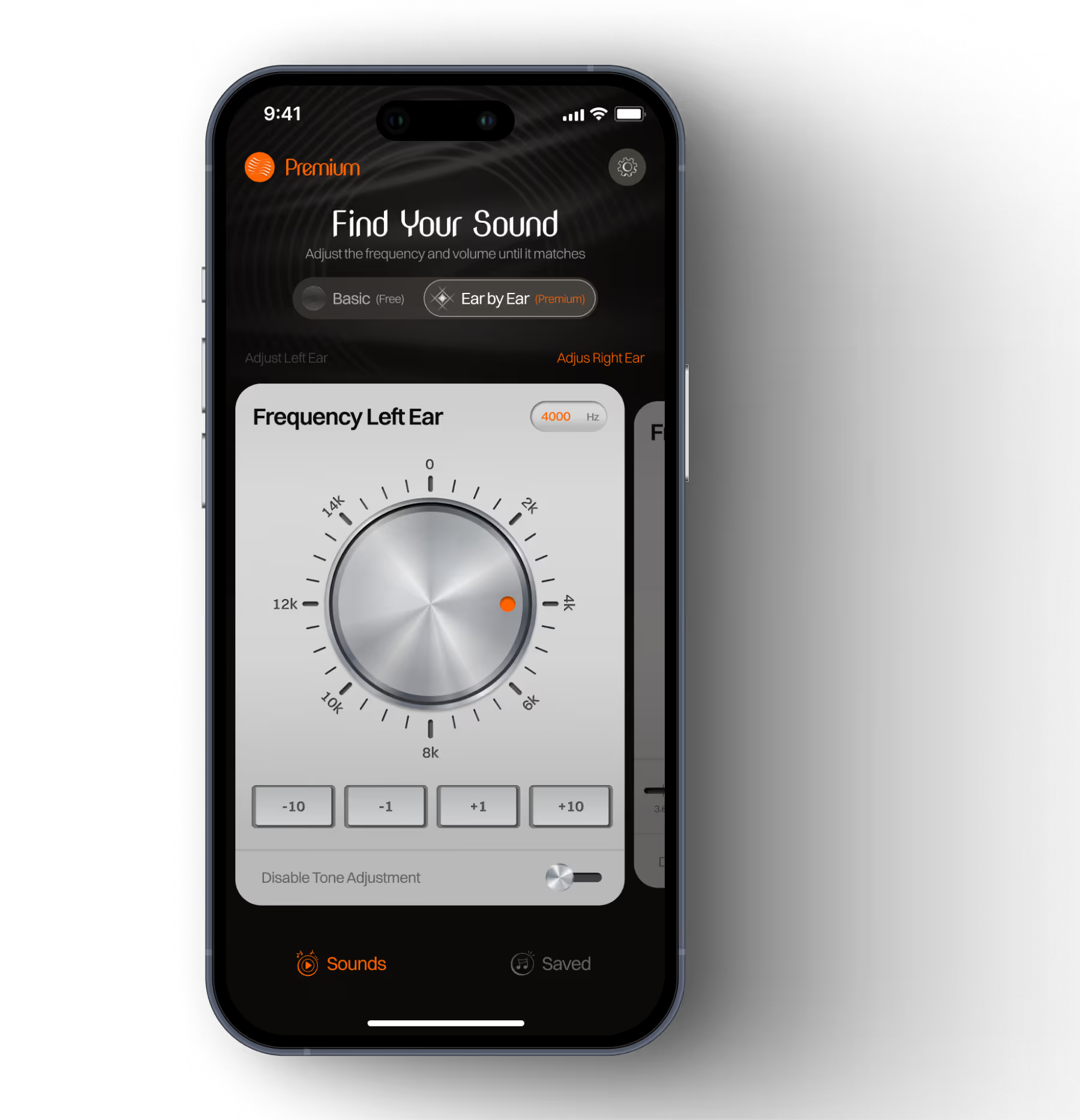
Four things: two independent sound layers — a masking sound and a pitch-matched tone (100–15,000 Hz) — that you press play on alone or together at independent volumes; continuous background play during phone calls, Zoom, and a locked screen — free for everyone; on Premium, 44 therapeutic sounds and a sleep timer with auto fade-out. A browser tab cannot do any of those.
8 min read · Updated May 2026 · Reviewed by the Tinnitus Relief App team
Hear each noise colour right now — no download, no account. Press play, adjust the volume, find what feels less harsh against your tinnitus. Then see exactly what the Tinnitus Relief App adds that a browser tab cannot — starting with the one feature most other apps still get wrong.
Tip: set the volume so your tinnitus is still faintly audible — partial coverage works better than full masking.
Audio plays on this tab only and stops when you switch apps.
This browser player stops when you switch apps or take a call. For continuous background play during phone calls, Zoom, YouTube, and a locked screen, download the app. That's the one thing a browser cannot do — and it is the app's defining feature.
Each noise colour distributes sound energy across frequencies differently. The right one for you depends on the pitch of your tinnitus and what feels comfortable for long sessions. For a deeper science-led breakdown — and which colour matches which tinnitus pitch — read the dedicated guide to noise types for tinnitus.
Static or hissing-waterfall texture. Broadest coverage. Often used during focused work. Can feel harsh in long sessions.
Steady rainfall texture. Less fatiguing for long daytime use. Many people find it the most comfortable all-day option.
Strong-fan or distant-thunder texture. Most popular for bedtime. Comfortable for sleep over long periods.
Between pink and brown — outdoor-nature feel. A neutral starting point if white feels harsh and brown feels heavy.
The most common mistake with sound therapy for tinnitus is turning the volume too high. Full masking — where you cannot hear the tinnitus at all — is not the goal. Set the volume so your tinnitus is still faintly audible alongside the background sound — present, but less dominant. If you cannot hear it at all, turn it down slightly. Partial coverage tends to support habituation better than full masking, and reduces the risk of inadvertent over-exposure. Individual results vary significantly.
The browser player above is a free taste of sound therapy. The app is built for everything a browser tab cannot do — continuous playback through interruptions, personalised pitch matching, a curated sound library, and a sleep timer with fade-out. Here is every feature, what it does, and which tier it is on.
📞 Background play during calls — the differentiator
FREE for everyoneMost tinnitus apps pause the moment a call arrives or another app takes the audio focus. Tinnitus Relief App keeps the background audio session active through every interruption. Volume routes independently so the therapy sound stays inaudible to the person on the other end of the call.
🎛️ Pitch-matched tone — its own sound layer
FREETinnitus has a specific pitch. The frequency dial generates an external tone tuned to your exact tinnitus frequency anywhere from 100 to 15,000 Hz. It is its own sound layer. Press play on the pitch tone alone, on a masking sound alone, or both together at independent volumes. Most people use the pitch-matched tone on its own at low volume during the day and add brown noise on top for sleep.
Full walk-through: how to find your tinnitus frequency.
🎵 44-sound library
White noise FREE · 43 sounds PremiumWhite noise is included for every user on the free tier. Premium unlocks 43 additional sounds curated specifically for tinnitus masking — including brown noise, rain on a roof, distant storm, ocean waves, forest, fireplace, cat purring, and category-specific high-frequency masking sounds (frog chorus, spring peepers) for high-pitched tinnitus.
🌙 Sleep timer with fade-out
Premium · 7-day trialSet a timer for 30, 60, 90, or 120 minutes — or play through the night. Audio fades out gradually over the final two minutes rather than cutting abruptly. Works with any sound or layered combination. The timer keeps running through phone calls.
🔒 No account · Offline · Private
FREE for everyoneOpen the app and start. No account, no email, no personal data collected or transmitted. All sounds work offline after install — no buffering, no dropouts in flight or underground. Frequency matches and presets stay on your device only.
| Feature | Free | Premium |
|---|---|---|
| White noise | ✓ | ✓ |
| Frequency matching (100–15,000 Hz) | ✓ | ✓ |
| Background play during calls, Zoom, locked screen | ✓ | ✓ |
| Offline mode | ✓ | ✓ |
| No account or signup | ✓ | ✓ |
| 44 therapeutic sounds (brown, pink, rain, ocean, forest…) | — | ✓ |
| Sleep timer with auto fade-out | — | ✓ |
| Per-ear frequency control | — | ✓ |
| Unlimited saved presets | — | ✓ |
Premium is $49.99 per year with a 7-day free trial, or $79.99 as a one-time lifetime purchase. No subscription is required to use the core features above.
Install from the App Store or Google Play. No account, no email, no card. The app opens straight to the sound library.
Two independent options. Turn on the pitch-matched tone and slide the dial to your tinnitus frequency (100 Hz–15,000 Hz). Turn on a masking sound. Or play both, at independent volumes. White noise + pitch are free; 43 more masking sounds unlock on Premium.
Take calls, open YouTube, lock your screen — sound therapy keeps running. For sleep, set a Premium fade-out timer.
Free — no signup required
Background sound therapy that keeps playing through every call, meeting, and locked screen. Start with white noise and frequency matching — free on iOS and Android.
Is the browser sound generator really free?
Yes — the player on this page is completely free with no account, no email, and no time limit. It generates white, pink, brown, and green noise in your browser using the Web Audio API. The browser player stops when you switch apps or take a call. For continuous play during interruptions, the free app on iOS and Android is the next step.
Can a sound therapy app cure tinnitus?
No. There is currently no universal cure for tinnitus, and Tinnitus Relief App is not a medical device. Sound therapy is a management approach — some people report meaningfully reduced awareness with consistent daily use, particularly at bedtime and in quiet environments. Individual results vary significantly. Consult a qualified healthcare professional for personalised advice.
Can I use the app during phone calls?
Yes — this is the app's defining feature. Sound therapy continues during phone calls, Zoom, FaceTime, YouTube, and when your screen is locked. Background play is free for every user, no subscription needed. The browser player on this page does not — that is the gap the app was built to close.
Which types of tinnitus does sound therapy help with?
Sound therapy is most commonly used for subjective tinnitus — the kind only you can hear — including high-pitched ringing, hissing, buzzing, and humming. It is less suitable for pulsatile tinnitus (a rhythmic sound that beats with your heartbeat), which should be evaluated by a healthcare professional before relying on any app or self-management tool.
How long until I notice any relief?
Some people notice the ringing feels quieter within the first session — especially during sleep or in quiet rooms. This is short-term masking. Longer-term habituation, where the brain learns to deprioritise the signal, tends to develop over weeks to months of consistent daily use. Individual results vary significantly.
How loud should the sound be?
Set the volume so your tinnitus is still faintly audible alongside the background sound — present, but less dominant. Full masking is not the goal. Never set the volume louder than normal conversational speech. If you experience ear pain, hearing sensitivity, or worsening symptoms, stop and consult a healthcare professional.
Is the app free? What does Premium include?
The core app is free — white noise, background play during calls and locked screen, and frequency matching at 100–15,000 Hz are all free with no expiry. Premium ($49.99/year with a 7-day trial, or $79.99 lifetime) unlocks 44 therapeutic sounds, sleep timer with auto fade-out, per-ear frequency control, and unlimited saved presets.
Is sound therapy for tinnitus safe?
Sound therapy at comfortable volumes is generally considered safe for most people when used as directed. Keep the volume low enough that your tinnitus is still faintly audible — louder is not more effective. If you have hearing loss or any concern about your ears, speak with an audiologist before starting. Stop and consult a professional if you experience worsening symptoms, ear pain, or one-sided changes.
Important. Tinnitus Relief App is not a medical device and does not diagnose, treat, cure, or prevent any medical condition. If your tinnitus is new, sudden, in one ear only, pulsatile, or accompanied by hearing loss, dizziness, or pain, consult a healthcare professional. Individual results vary significantly.
.avif)
Need it to keep playing during calls, sleep, and while using other apps? This browser player stops when you switch. The app doesn't. Plus 40 more sounds, per-ear frequency matching, and a sleep timer with fade-out.
iOS
AndroidYour sound therapy keeps running when you take a phone call, join a meeting, open YouTube, or lock your screen. No pausing. No reconnecting. Most tinnitus apps stop the moment another app uses audio — this one does not.
Tinnitus has a specific pitch. The frequency dial lets you find and lock in your exact tinnitus frequency per ear — so the sounds you choose can be matched to it precisely.

Set a timer for 30, 60, 90, or 120 minutes — or play all night. Audio fades out gradually over the final two minutes so silence does not jolt you awake when the timer ends.
Open the app and start. No signup, no email, no personal data collected or transmitted. All sounds play offline — no buffering, no dropouts in flight or underground.
The browser generator plays the 4 noise colours. The app adds 40 more — organised into 6 categories. White noise is free; everything else is Premium with a 7-day free trial.


.webp)


.webp)


.webp)


.png)

.webp)


.png)


.webp)

Answer 5 quick questions about your tinnitus — pitch, timing, and what bothers you most — and get a personalised sound recommendation with settings to try.
Take the sound finder quiz →Take a free 2-minute self-assessment inspired by the clinically validated THI questionnaire. Get your score and personalised next steps.
Take the self-assessment →From first download to your first session of relief — setup takes under three minutes.
Available on iOS App Store and Google Play. No account, no signup. Open it and the app is ready immediately. White noise and background play are free forever.
Use the frequency matching dial to identify your tinnitus pitch (100–15,000 Hz). Then browse the sound library and try the noise colour that best matches your pitch. The frequency matching guide walks you through it in two minutes.
Set volume to partial masking level — tinnitus still faintly audible. Take a call, open YouTube, lock your screen. The sound keeps playing. For sleep, set a timer with auto fade-out. Read our sleeping with tinnitus guide for full bedtime strategies.
Download free. Start with white noise and background play. If you want 44 sounds and a sleep timer, the 7-day Premium trial is included — no commitment needed.